Building a youth sport events system
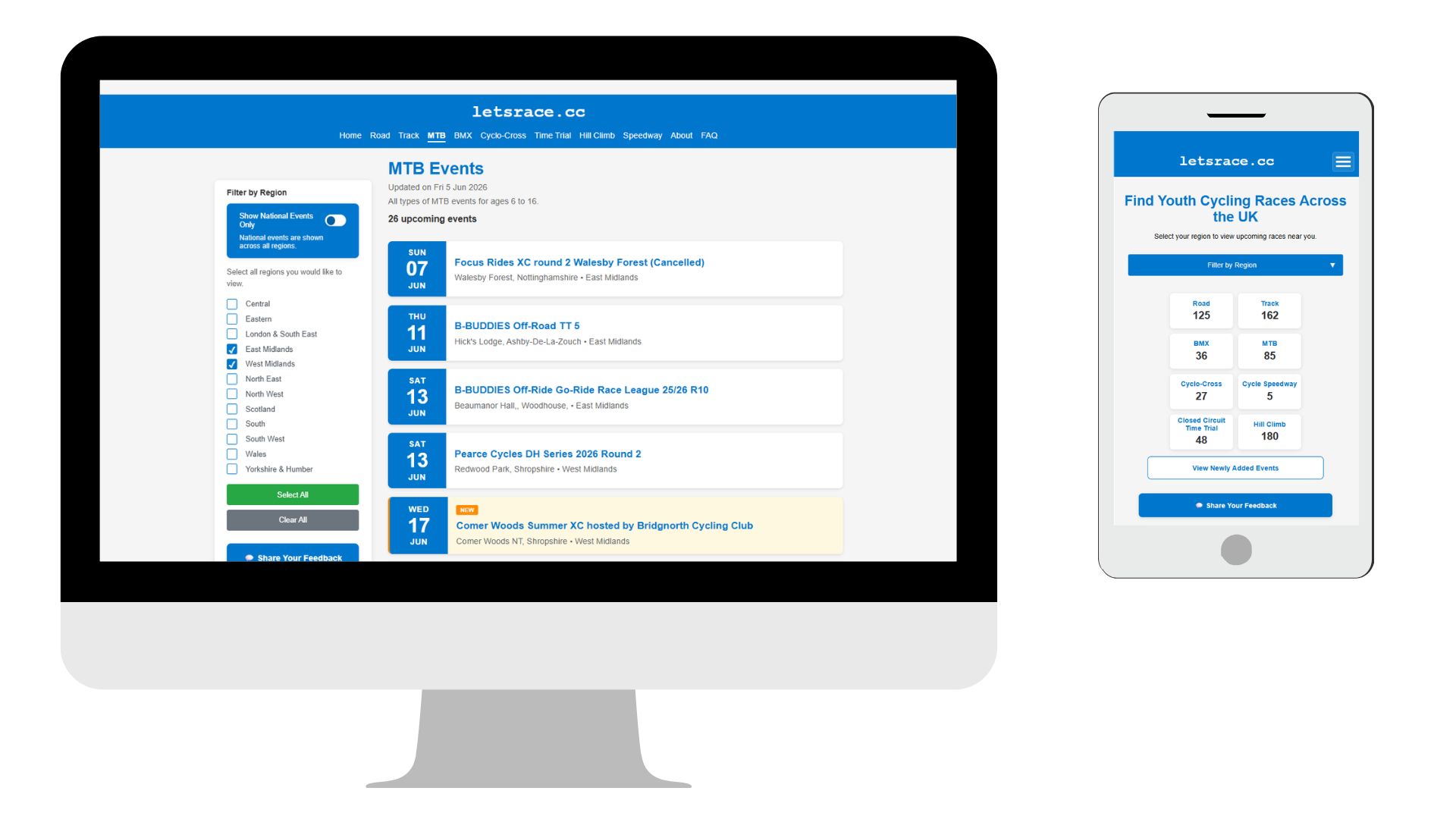
Every so often I start a personal project in an attempt to keep my technical skills fresh, usually solving a personal problem of some kind. Recently I’ve been working on a solution to an issue that affects me as the parent of a teenage bike racer. The problem is a simple one – finding local youth cycle races. What should be a simple thing involves searching multiple, clunky websites just to figure out what races are happening nearby. If I find it difficult as a tech professional, what hope do less digitally proficient parents have? So I decided to set about building a website that pools all the event data from multiple sources into one, easy to use website.
Rules of engagement
Projects like this are a great way to try out multiple new things. So I set myself a few personal objectives for the project.
- 100% content automation. All data collection and daily updates must be completely automated. I don’t want to lift a finger to update any content.
- 100% vibe coded. I see all the posts about ‘AI can build your product’ and it smells like bullshit. Let’s find out.
- Low cost cloud infrastructure. The whole solution must run on pennies, plus it’s a great excuse to learn a smattering of cloud infrastructure skills.
- No databases. Why default to vintage tech? There are simpler and more graceful ways to structure small volumes of read-only data.
- No cookies. Ruined by marketing tech to the point that everyone now hates them and browsers are planning to make them obsolete. Cookies are dead to me, let’s leave that world behind.
- Static HTML website. Simple, elegant, minimal use of resources. It may feel like going back to the 90s, but it’s also back in vogue with the green tech crowd. What’s not to like?
- Fast page loads. I’m very impatient with website page loads, and this should come naturally with being a static HTML site anyway.
So… what have I built and learned?
First off, here’s the site: LetsRace.cc – a youth-focused cycling events hub. It brings together every discipline – road, track, BMX, MTB, cyclo-cross, cycle speedway, hill climbing and time trialling – into a simple, mobile-first site.

Let’s take each requirement in turn and see how it all panned out..
Fully automated data pipeline
This was the main learning curve for me. Around 3am every night a lightweight AWS server spins up and launches a process which scrapes event details from multiple websites and saves it all into temporary CSV files on a Google Drive.
At around 4am, once the AWS server has safely shut down, a Google Sheet (my main Events sheet) runs a scheduled process using a Google Apps Script to import any new or updated data from the CSV files, cleaning and standardising the data as it goes.
And then at the crack of dawn another Google Apps Script converts this Google Sheet data into a set of discipline-specific JSON files (BMX, MTB, etc). These are saved into a GitHub repository, and all of the website event pages are recompiled.
The result: event listings updated nightly and compiled into static web pages with zero manual intervention and no fuss. All while I’m asleep.
This was great fun to set up, and I got to learn a lot about setting up AWS EC2 instances and Lamda functions, Google Apps Scripts, and GitHub Pages. I know web scraping is frowned upon by some, but none of my event source sites provide an API feed for developers, or have adopted standards like ActivityPub, if they ever do then I’ll switch to those and ditch the scraper!
Learning to vibe code
I’ve been a long time dabbler in code, never a professional though. My career as a software engineer is more of a generalist spanning all the disciplines of requirements analysis, solution design, technical project and product management, quality assurance. But I understand enough about coding to get a Software Engineering degree, and it makes a huge difference when managing software development teams, but it’s never been a personal ambition to become a programmer. So vibe coding tools are a real gift for me.
I initially started the build with ChatGPT. It did a reasonable job of improving my JSON macro for the web scraping, writing Google Apps Scripts, and building the first version of the website. But it was a royal pain in the arse having to copy and paste code from ChatGPT into my code repo. A friend who I co-work with recommended Cursor (thanks Kaspar!). I ran a free trial, hooked it up to my repo and gave it a whirl. My jaw hit the floor as it turned my instructions into working code which was version controlled and could be instantly tested in the browser. Yes it got itself into a pickle and would do completely stupid things from time to time, but I soon learned how to write better prompts and to use its rules system to set constraints so that it wouldn’t go off and rewrite the entire website on a whim.
Cursor made me instantly more productive and I started flying through the project. But the rules are key, not just to make it work more efficiently for me, but to spend less time doing stuff it didn’t need to, less processing in a faraway data centre, meaning less environmental impact too. We all need to get more efficient with this stuff.
Could it handle the build alone? No bloody way. It was more like an apprentice for whom I had to set clear tasks, monitor output, and give feedback on how to do things better. But it supercharged the project development. I’m now a Cursor convert, and I took out a basic monthly subscription.
Low cost infrastructure
The AWS setup was new to me, I’d run teams before that utilised AWS but we’d have cloud engineers for this stuff, so it was good to learn how to set up EC2 servers, control them via Lambda functions, use S3 buckets for secure data storage, run SES for email services and CloudWatch for logging. A great learning experience.
The data capture is done using a free tool called Ui.Vision for the website scraping, which runs on the AWS server. I had purchased a ui.vision extension for a previous project that boosts its capabilities for a $50 lifetime fee, so it was good to use that again. I think you could probably do it all in Python or Curl for nothing though, I may try porting it over some time. Ultimately, the macros are just a bunch of JSON scripts.
The AWS infrastructure that runs the night shift comes in at well under $3 per month. The data pipeline runs on a free Google Workspace, using Google Drive for storing the CSV files, Google Sheets for the master ‘database’ and Google Apps Scripts for data processing, all for free. The website itself is hosted on GitHub Pages, which provides hosting, CDN and SSL all on my free GitHub account.
Net result: the whole shebang operates on less than the cost of a coffee and cake stop on a Sunday ride!
No databases
A database management system such as MySQL for an events platform would seem a natural choice, but this data is on a one way journey, from source websites into my website and into the eyes of readers. There are no users creating, updating or deleting any data, it’s a read only model. So we don’t need any of that vintage database tech.
Technically the Google Sheet IS my database. The Google App Scripts turn that data into a clean, versioned set of static JSON files: one shard per discipline and region. These are then pushed up to the code repository during the nightly automation run. From there the build process reads the JSON files and rebuilds the static web pages, the final job of the night. I don’t know if there is a simpler and more elegant way to do all this, but I love that it’s all just quietly moving data around and building stuff in the dead of night.
No cookies
Unless you’re in the privacy-invading marketing brigade, there isn’t much of a remaining use case for cookies, especially for a site like this with no authentication required. There are search filters which persist across pages, but these can be reliably handled with URL parameters and if users want to hack the URL, they’re more than welcome to do so.
Even my analytics tool doesn’t need cookies. Goat Counter is an open source and ethical analytics tool with no tracking of any personal data, and is so privacy-aware that it doesn’t even need a GDPR notice. It’s good to see basic usage stats, but I don’t need anything more than that.
The big upside to all this is that there is no super-annoying cookie banner getting in the way of the user experience, a massive bonus! It also future-proofs the site against any future browser privacy restrictions that might impact sites relying on session cookies (this is coming, apparently). I’m looking forward to a future where cookies have been made obsolete.
A modern, simple responsive website
I like the simplicity of the finished site. It does exactly what it needs to do. There’s not a single image on the entire site, any images would just be frivolous and pointless, adding nothing to the experience. It definitely looks better on a mobile phone, and I’d like to improve the desktop layout over time. But pages are lightweight, load quickly, use very little bandwidth, are nicely responsive, and use very little server resource. Happy days!
Fast page loads
With simplicity SHOULD come speed. But leaving the AI to its own devices did result in some page bloat. Using the browser inspector to measure page element sizes and load times, meant I could then upload those results back into Cursor and get it to make the page more efficient. The homepage started at 4.5MB, and much of the problem was down to a simple button provided by Google for a Google Feedback Form, which preloaded all sorts of crazy stuff. All that stupidity was quickly stripped out. Page sizes are now routinely under 150Kb, load times are mostly under 200ms. This is about 10 times faster and lighter than both ChatGPT and Gemini suggest a fast loading events site should be operating at.
Final reflection
As a personal project, this has been a blast and I have learned so much about many different things. Early user feedback has been excellent, parents have told me it makes their lives so much easier finding youth bike races. A few have spotted bugs or suggested improvements, which I have been able to action. I’m not sure where it goes from here but I’ll certainly maintain it and keep improving it, providing a service to a community that is otherwise poorly served by outdated and badly designed tech.